✅ 개요
스프링 부트에서는 이메일 전송을 쉽게 구현할 수 있습니다. 여기에 추가로 `@Async`를 활용한 비동기 처리로 성능 개선 과정을 정리하고자 합니다.
✅ Before
먼저 기존 코드는 다음과 같습니다. 사용자는 이메일로 받은 링크를 클릭하면 이메일 인증 처리가 되는 구조로 설계되어 있습니다.
public void sendEmail(Long guestId) {
    Guest guest = guestRepository.findById(guestId)
                                 .orElseThrow(() -> new EntityNotFoundException("Guest with id " + guestId + "cannot be found"));

    String token = UUID.randomUUID().toString();
    String key = getRedisKey(token);

    String link = baseUrl + "/api/auth/email/verify?token=" + token;
    String subject = "[Airbnb-2M] 이메일 인증을 완료해주세요.";
    String html = generateHtml(link);
    String email = guest.getEmail();

    try {
        MimeMessage mimeMessage = javaMailSender.createMimeMessage();
        MimeMessageHelper helper = new MimeMessageHelper(mimeMessage, true, "UTF-8");
        helper.setTo(email);
        helper.setSubject(subject);
        helper.setText(html, true);
        helper.setReplyTo("no-reply@airbnb-2m.com");

        javaMailSender.send(mimeMessage);
        redisRepository.setValue(key, guestId.toString(), Duration.ofHours(1));

        log.debug("이메일 인증 링크 전송: {}", email);

    } catch (MessagingException e) {
    	log.warn("이메일 인증 링크 전송 실패: {}", email);
        throw new MailSendException("메일 전송 과정에서 오류가 발생했습니다, " + e.getMessage(), e);
    }
}
✅ After
1️⃣ V1
Spring에서는 `@Async` 어노테이션으로 편리하게 비동기 처리를 구현할 수 있습니다.
@Async
public void sendEmail(Long guestId) {
	//...
}
@EnableAsync
@Configuration
public class AsyncConfig {
}
2️⃣ V2
기본적으로 `@EnableAsync`만 적용하면 `SimpleAsyncTaskExecutor`에 의해 동작합니다. 이 클래스는 작업마다 스레드를 새로 생성한다는 단점이 있기 때문에 직접 스레드 풀을 설정하는 것이 좋습니다.
@Slf4j
@EnableAsync
@Configuration
public class AsyncConfig implements AsyncConfigurer {

    @Bean(name = TaskExecutionAutoConfiguration.APPLICATION_TASK_EXECUTOR_BEAN_NAME)
    public ThreadPoolTaskExecutor executor() {
        ThreadPoolTaskExecutor executor = new ThreadPoolTaskExecutor();

        int cores = Runtime.getRuntime().availableProcessors();

        executor.setCorePoolSize(cores);
        executor.setMaxPoolSize(cores);
        executor.setThreadNamePrefix("async");
        executor.setQueueCapacity(1_000_000);
        executor.setAwaitTerminationSeconds(5);
        executor.setWaitForTasksToCompleteOnShutdown(true);
        executor.initialize();
        executor.getThreadPoolExecutor().prestartAllCoreThreads();

        return executor;
    }

    @Override
    public Executor getAsyncExecutor() {
        return executor();
    }

    @Override
    public AsyncUncaughtExceptionHandler getAsyncUncaughtExceptionHandler() {
        return (ex, method, params) -> {
            log.error("Error on async execution: {}", method.toGenericString(), ex);
        };
    }
}
3️⃣ V3
비동기 설정은 아니지만 모종의 이유로 이메일 전송에 실패했을 때 자동으로 재전송을 시도하도록 설정했습니다.
@Async
@Retryable(retryFor = MailSendException.class, backoff = @Backoff(delay = 1000))
public void sendEmail(Long guestId) {
	//...
    int retryCount = RetrySynchronizationManager.getContext().getRetryCount();
    log.debug("이메일 인증 링크 전송: {}, 시도 횟수 {}", email, retryCount);

    javaMailSender.send(mimeMessage);
    //...
}

@Recover
public void recoverSendEmail(MailException ex) {
    log.error("[메일 전송 실패]", ex);
}
✅ 성능 비교
Artillery를 사용해 동기와 비동기의 성능 차이를 비교해 보겠습니다. 스크립트는 다음과 같이 로그인 이후 이메일 인증 요청을 하는 시나리오를 구성했습니다.
config:
  target: http://localhost:8081
  phases:
    - duration: 15
      arrivalRate: 3
      name: Warm up
    - duration: 60
      arrivalRate: 10
      rampTo: 40
      name: Heavy load test
    - duration: 30
      arrivalRate: 40
      name: Peak load
  http:
    timeout: 60
  payload:
    path: "login-data.csv"
    fields:
      - "email"
      - "password"
    order: sequence
  processor: "./processors.js"
scenarios:
  - name: "email verify"
    flow:
      - post:
          url: "/api/auth/login"
          json:
            email: "{{ email }}"
            password: "{{ password }}"
          afterResponse: "captureAuthToken"
      - post:
          url: "/api/auth/email/verify"
          headers:
Authorization: "Bearer {{ token }}"- 워밍업 단계 : 15초 동안 초당 3회 요청
- 램프업 단계 : 60초 동안 초당 10회에서 최대 40회 요청
- 최대부하(마무리) 단계 : 30초 동안 초당 40회 요청
부하 테스트 시 SMTP는 실제 설정한 구글 대신 MailDev로 대체하였으며, `capture`는 응답 바디에만 사용할 수 있는 것 같아 GPT 도움으로 로그인 이후 헤더에서 토큰을 얻는 js 파일을 만들었습니다.
'use strict';

module.exports = {
    captureAuthToken: function (requestParams, response, context, ee, next) {
        const authHeader = response.headers['authorization'] || response.headers['Authorization'];
        if (authHeader) {
            context.vars.token = authHeader.replace('Bearer ', '');
        } else {
            console.log('No Authorization header found');
        }
        return next();
    }
};
결과 확인
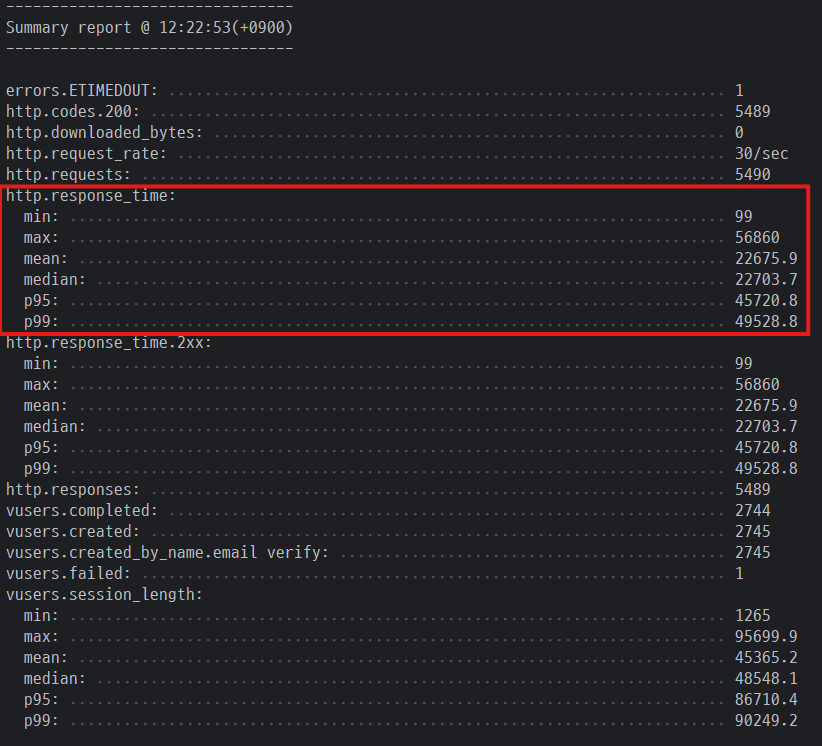
동기 처리 결과 : median(22.7s), p95(45.7s), p99(49.5s)
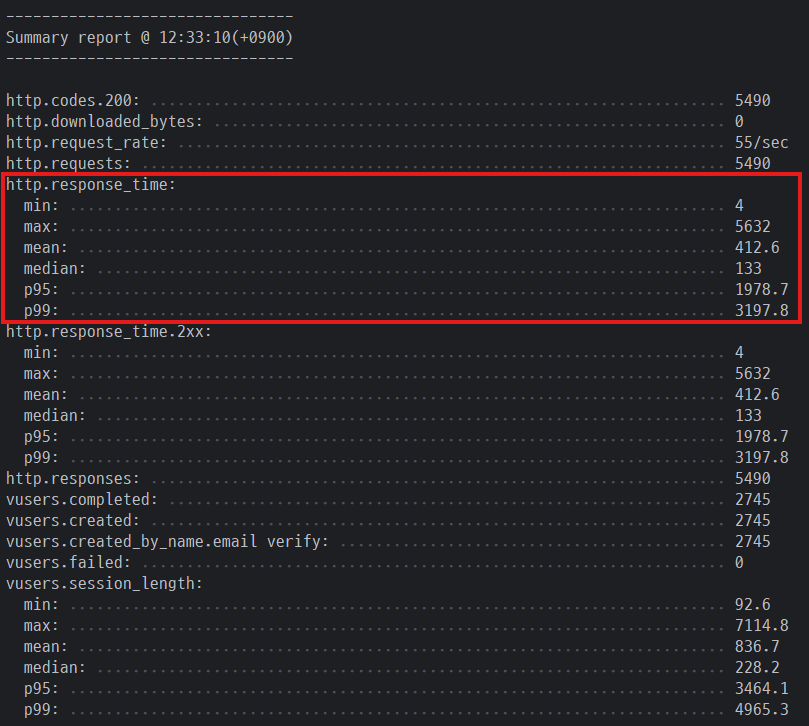
비동기 처리 결과 : median(133ms), p95(1.9s), p99(3.2s)
결과적으로 비동기 처리 도입 후 (median 기준) 약 99% 성능 개선을 할 수 있게 되었습니다.
🔖 참고
https://mangkyu.tistory.com/425
https://www.baeldung.com/spring-async
https://dkswhdgur246.tistory.com/68
https://nahyeon99.tistory.com/59
https://dkswhdgur246.tistory.com/69
https://www.baeldung.com/spring-retry
'Spring' 카테고리의 다른 글
| Spring AI 개발 일지 (2) - OpenAI 사용해 후기 요약 구현해보기 (0) | 2025.11.19 |
|---|---|
| Spring AI 개발 일지 (1) - Spring AI 소개와 핵심 모델 (0) | 2025.11.19 |
| PageableExecutionUtils.getPage로 페이징 성능 개선하기 (0) | 2025.10.24 |
| Spring AbstractRequestLoggingFilter로 RequestBody 로깅 찍기 (0) | 2025.10.14 |
| Spring + Toss payments로 결제 기능 개발하기 (0) | 2025.10.13 |